Shan Shen Bu Photo Tips: The Input That Saves Credits
 Shan Shen Bu AI Team
What makes a photo work for a shan shen bu render: angles, daylight, full-body framing, hands and feet, pets, two-person shots and a pre-upload checklist.
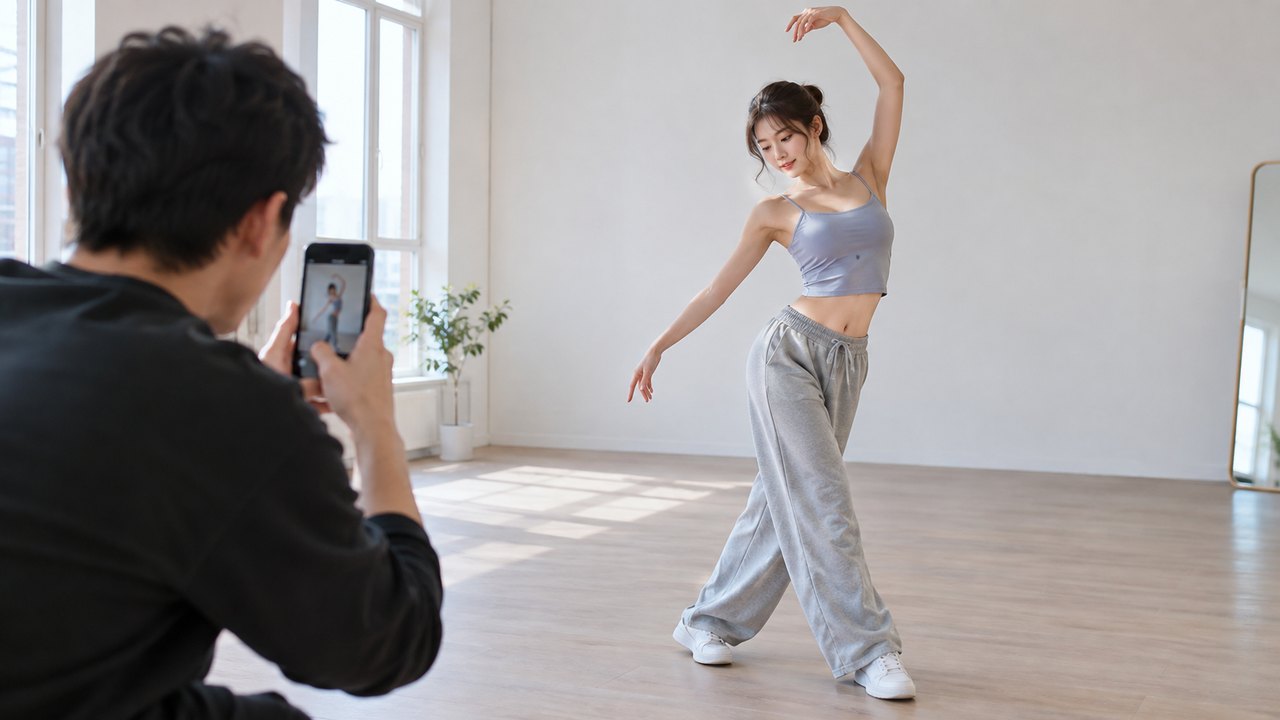
A shan shen bu render can only work with what the photo shows. If the model cannot see your feet, it will invent them. If half your face is in shadow, it will guess. The difference between a clip that looks like you and one that looks like a distant relative is usually the photo, not the prompt.
This guide covers the angle, light and framing that give the model useful information, plus the two-person and pet cases, the things that make a render drift, and a checklist to run before you spend credits.
The short version: stand in even daylight, show your whole body from head to feet, keep your hands and shoes visible, and put a plain wall behind you. That combination solves most problems before they start.
Example loaded — edit it or generate.
This clip: 30 credits · 11 clips a month for $39.90 (Pro), or 120 a year for $319
What the model needs from the photo
A photo-to-video model is doing two jobs at once. It has to recognize the subject well enough to keep the face, body shape, clothing and setting consistent, and it has to invent a moving body from a still image. The more information the photo contains about the subject, the less the model has to invent.
Five things matter most:
- The face, clearly lit and facing the camera.
- The hands, visible and not in pockets or behind the body.
- The feet, both of them, inside the frame.
- The full body, including shoulders and hips, in proportion.
- A background that is clearly separate from the subject.
When one of those is missing, the model fills the gap. A hidden foot becomes an extra foot, a misplaced shoe or a sliding contact with the floor. A shadowed face becomes a different face. None of those outcomes are worth the credits.
Angle: front or a slight three-quarter turn
The most reliable angle is straight on, with the camera at about chest height. A slight three-quarter turn also works if both eyes and both shoulders are visible. Avoid three angles in particular.
High angle. Shooting down at someone makes the head large and the feet small. The model will carry that distortion into a full-body dance and the proportions will look wrong.
Low angle. Shooting up stretches the legs and shortens the torso. It can look dramatic in a still and strange in a dance clip.
Full side profile. A profile hides one eye, one arm and half the body. The model has to guess the hidden side, and guessed limbs are where most visible errors come from.
If you are using a phone, ask someone to take the photo rather than balancing the phone on a shelf. A stable camera at chest height is worth more than a clever angle.
Light: even daylight, no hard shadows
The best light for a photo-to-video render is open shade or a window with soft daylight. The face should be evenly lit, with no bright stripe across one eye and no deep shadow under the nose.
Avoid direct midday sun. It creates hard shadows and makes people squint. Avoid standing with a bright window behind you, which turns the face into a silhouette. Avoid a single overhead bulb, which puts shadows under the eyes and chin.
If you are indoors, face the largest window in the room. Turn off overhead lights if they add a second, competing shadow. If the day is overcast, go outside; cloud cover is a large softbox.
A phone flash is usually worse than no flash. It flattens the face and creates a hard edge behind the subject. Use it only if there is no other light and the room is genuinely dark.
Background: plain and separate
A plain wall, a closed door or an empty room is ideal. The background should be visually quieter than the person, with a clear edge between the two.
Avoid crowds, busy street scenes, shelves full of objects, large text, mirrors and other people. The model may pull details from the background into the render, or blend the edge of your arm into a poster behind it. A mirror is especially risky because it doubles the subject and can confuse which body is being animated.
If you only have a busy room, move close to a blank wall and step back until your whole body is in frame. A plain background behind a full-body subject is better than a beautiful room that hides your feet.
Framing: full body with a little margin
Shoot vertically, with your whole body from the top of your head to the soles of your shoes. Leave a hand's width of space above your head and below your feet. Do not crop at the ankles, and do not let the frame cut off a hand.
Step back rather than zooming. Digital zoom softens the image and reduces the detail the model can use. If your phone has an ultrawide lens, do not use it for a full-body shot unless you have to; wide lenses stretch whatever sits near the border of the frame, and feet usually sit near the border.
Keep the camera level. Tilting the phone up or down changes the distance between the lens and your head versus your feet, which changes the proportions.
Hands and feet
Hands and feet are the two areas where generated video most often fails, so give the photo every chance to get them right.
Keep your hands out of your pockets, away from your face and not clasped behind your back. Let them hang naturally at your sides or rest lightly on your hips. Roll sleeves up rather than letting them swallow your hands.
Stand with your feet slightly apart, both shoes fully visible and flat on the floor. Avoid crossing your ankles, standing on one leg, or tucking one foot behind the other. If you are barefoot, make sure both feet are clearly lit; a dark foot on a dark floor is effectively invisible.
Clothing and accessories
Simple, solid colors work better than busy patterns. Large logos and text can be reproduced badly or smeared across the render. Fine stripes and tight checks can shimmer when the body moves.
Avoid hats that hide the hairline, sunglasses that hide the eyes, and scarves that cover the neck and chin. If you normally wear glasses, keep them on; the model should preserve them, and a sudden disappearance looks worse than a pair of frames.
Pick clothing that shows your body shape. A loose coat is fine, but a shape that hides your shoulders, waist and knees gives the model less to work with when it builds the dance.
The two-person scene
The studio accepts one or two people in a photo. For two people, both subjects need the same treatment as a single subject: full body, both faces clear, both sets of hands and feet visible.
Stand side by side with a small gap between you, not overlapping. Decide who is on the left and who is on the right before the shot, because the generated clip will usually keep that arrangement. Keep both people at the same distance from the camera so neither is much larger than the other.
Do not use a photo where one person is much closer to the lens, or where one person's arm crosses the other's body. Overlap forces the model to separate two similar shapes, and that is where limbs get mixed up.
Only use a photo of people who have agreed to have a generated clip made from their likeness. A two-person clip is still a clip of two real people, even when the performance is synthetic.
The pet scene
For a cat or dog, use a photo of the pet alone. Full body, face visible, standing or sitting, with a plain background and no motion blur. A pet on a patterned blanket is harder than a pet on a plain floor.
Avoid photos where the animal is held in someone's arms, curled into a ball, or partly under furniture. The model needs to see the legs and tail to animate a whole-body shake. One pet per photo is the safe choice.
What makes a render drift
Drift is the gap between the person in your photo and the person in the clip. These inputs make it more likely:
- Screenshots. Recompression removes detail, especially around the eyes and hands.
- Beauty filters and heavy retouching. The model reproduces the filtered face, then the motion exposes the smoothing.
- Tight crops. A head-and-shoulders photo gives the model no legs, so it invents them.
- Heavy shadow. A face split between light and dark is two different faces to a model.
- Mirrored selfies. The image is flipped; text on clothing can reverse and left-right cues become unreliable.
- More than two people. The studio is built for one or two; extra people compete for attention.
- Motion blur. A blurred hand or foot is a guess, not information.
- A tiny subject in a wide shot. If the person is small in the frame, there are few pixels describing the face.
The fix is almost always a new photo, not a longer prompt. If the first render drifts, change the input before you change the wording.
Pre-upload checklist
Run through this list before you spend credits:
- One or two people, or one cat or dog. No group shots.
- Full body from head to feet, with margin above and below.
- Face clearly lit, both eyes visible, no strong shadow.
- Both hands visible and out of pockets.
- Both feet visible and flat on the floor.
- Plain background with a clear edge around the subject.
- Even daylight or soft window light; no phone flash if you can avoid it.
- No screenshot, no beauty filter, no heavy editing.
- Sharp image, no motion blur; step closer rather than zooming.
- Vertical framing for a vertical clip.
If a photo fails three or more of these checks, take a new one. It costs a few minutes; a wasted render costs credits.
Draft cheap, then commit
The cheapest way to test a photo is a 480p 12-second draft for 20 credits. Use it to check that the face, pose and framing survive the first motion before paying for the higher tier. A standard 720p 12-second render costs 35 credits. If the draft already shows a drifting face or melting hands, a higher resolution will not fix it.
The result is a generated performance, not a recording of the person in the photo. Label it as AI-generated when you post it, and do not describe it as real footage.
For the full workflow from photo to finished clip, read how to make a shan shen bu video. The photo-to-shan-shen-bu feature page lists the supported input types.
FAQ
Can I use a screenshot as my photo?
It will work, but it is a common cause of a soft or drifting render. Screenshots lose detail around the eyes, hands and feet. Use the original photo file if you still have it.
What if my photo has more than two people?
Crop it to one or two people, or take a new photo. The studio is designed for one or two subjects, and a crowd gives the model conflicting bodies to animate.
Will the AI change my face?
The model aims to preserve the face, hair and clothing from the photo, but it is a generated performance, not a copy. Small changes in expression and facial detail are normal. A sharp, evenly lit, front-facing photo gives the closest result.
Can I use a photo taken at night?
You can, but the result is less predictable. Night photos usually have noise, mixed color and deep shadows. A daylight photo with soft, even light is more reliable for the same credits.
Should I upload a photo with a filter?
No. Filters and beauty modes remove skin texture and change face shape. The model reproduces what it sees, and motion makes heavy retouching look artificial. Upload the unedited original.
Start with a better photo
The photo is the cheapest part of the process and the one that decides the result. Take one clear full-body shot in daylight, run the checklist, and try the studio with a single photo. The pricing page has the credit costs, and the photo tips feature page collects the input rules in one place.
Related guides
What Is Shan Shen Bu? Meaning, Origin and the Four Moves
Shan shen bu means flash step: a four-beat Chinese dance routine that went viral in 2026. Here is where it came from and what AI can and cannot do.
How to Make a Shan Shen Bu Video From One Photo
Turn one clear photo into a 10 to 15 second vertical shan shen bu clip. The full eight-step workflow, a photo checklist and the failures to expect.
Shan Shen Bu AI Prompts That Keep the Face and the Moves
A six-part prompt formula for shan shen bu AI video: subject, scene, four-beat action, camera, identity lock and exclusions, with four full examples.